

Electro-Mechanical Switches
Electro-Mechanical SP6T Switches
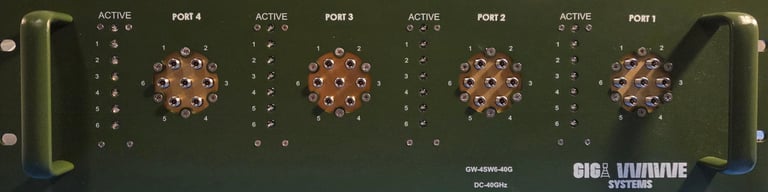
Gigawave offers four independently controlled electro-mechanical SP6T switches, operating from DC to 40 GHz with high isolation and minimal insertion loss. The absorptive switches are normally open and have a lifespan of 2 million switching cycles. Housed in a slim 19” rack chassis, the circular electromechanical switches feature 2.92 mm female RF connectors. Each active path is indicated by an LED on the front panel for clear visual status display. The switches can be controlled via USB or Ethernet, supporting SSH, HTTP, and Telnet network protocols. Additionally, a user-friendly GUI application is available for Windows, along with programming instructions for Linux.
Datasheets
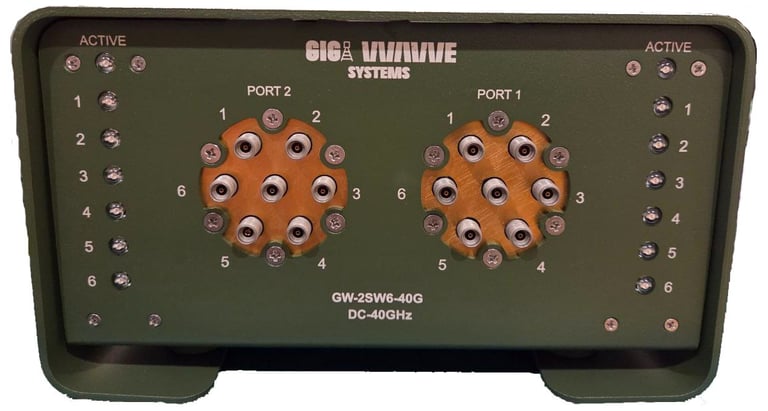
The Gigawave GW-2SW6-40G features two independently controlled electro-mechanical single-pole Six-throw (SP6T) switches, operating from DC to 40 GHz with high isolation and low insertion loss. These absorptive switches are designed with a failsafe, break-before-make conguration and o er a typical lifes pan of 2 million switching cycles when operated within the speci ed conditions. Housed in a compact and robust metal enclosure, the switch box is equipped with 2.92 mm (f) connectors and front-panel LED indicators for convenient test bench operation. Control is facilitated via USB (communi cations device class CDC, virtual com port) or Ethernet, enabling direct operation from a PC or remote access over a network. Comprehensive software support is provided, including programming instructions compatible with both Windows and Linux environments.
Datasheet
Windows GUI Control Software
This Windows-based graphical user interface (GUI) enables control of the RF mechanical switch via USB or LAN (TCP/IP) communication. The software is provided as a standalone executable (EXE) application and must be installed on the host computer prior to use. Please note that the installation process may take several minutes to complete.
The GUI is compatible with the 2-channel, 4-channel, and full-configuration versions of the RF mechanical switch.
When using the LAN interface, the RF switch is shipped with a default IP address of 192.168.0.110. Before establishing a network connection, the user must configure the computer’s Ethernet interface to an IP address within the 192.168.0.xxx subnet to ensure proper communication with the device.
Contact Us
info@gigawavesystem.com
© 2024. All rights reserved.

